


Using a "Signature" Pic


Thread Starter
|
Winching
Joined: Dec 2008
Posts: 558
Likes: 1
From: Oklahoma City
 Using a "Signature" Pic
So I finally got around to putting up a Sig Pic, and figured I would take some of the guesswork out of it for any body else that is interested in doing so but hasnt got around to it.
First you will click on User Cp in the Bar above..
Then "Edit Signature"
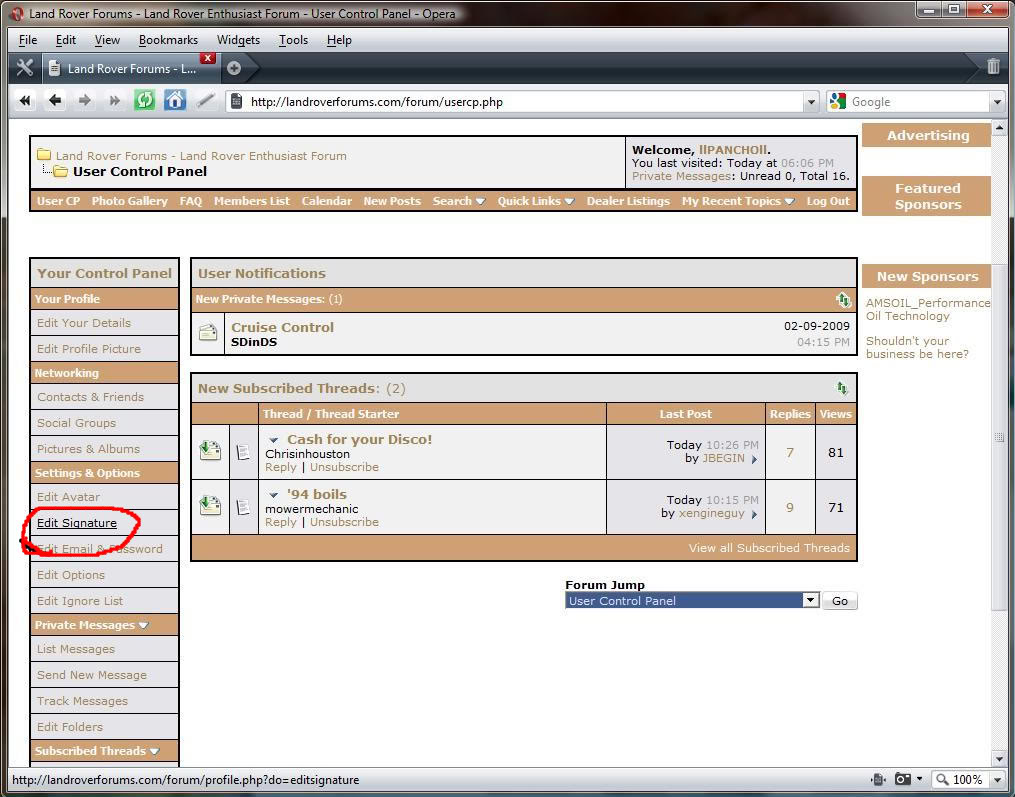
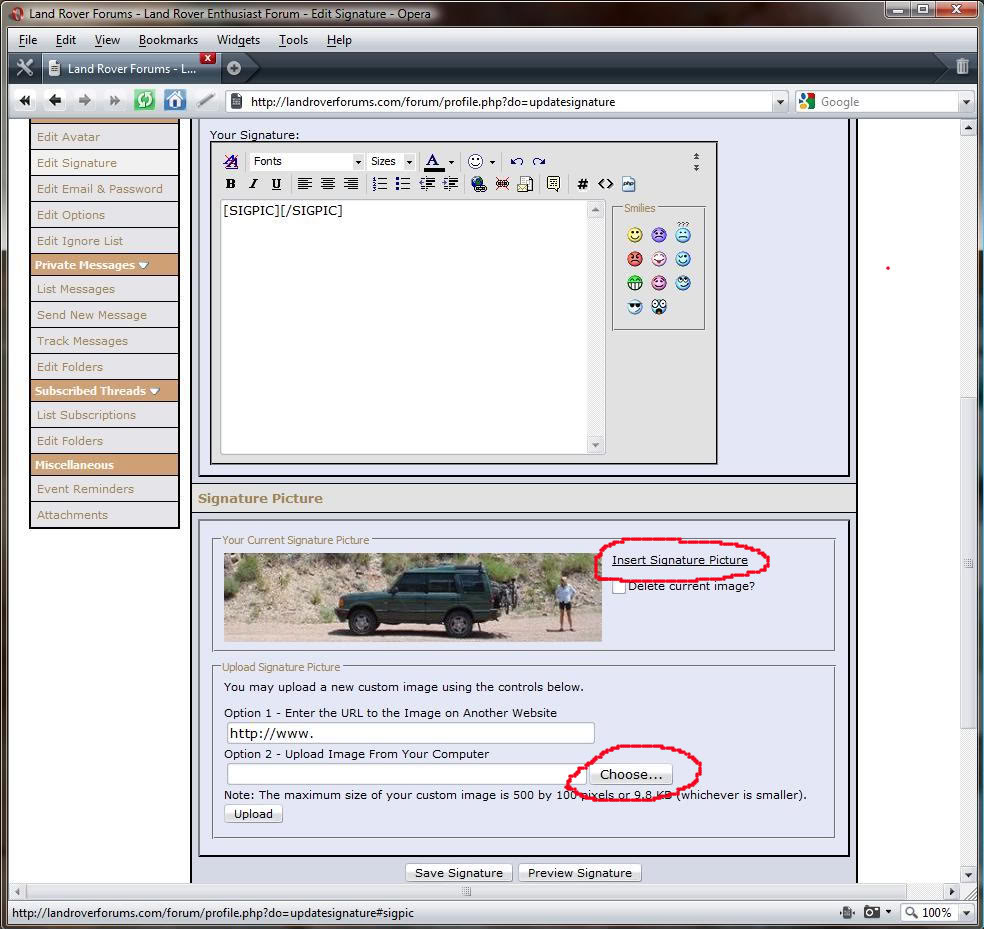
Then at the bottom of the page you should be able to pick you image from your computer and upload it.
Be advised that:
The maximum size of your custom image is 500 by 100 pixels or 9.8 KB (whichever is smaller).
So you might need to adjust the image you plan on using.
Once you upload the image you should should see it there in the "Edit" page, this does not mean you are done. You need to click the "Insert Sig Picture" text and that will place some [SigPic] text in the text field.
Then simply Grab the image with your cursor while holding left click and drag the image up to the text box.. Position your Curser so that the flashing "|" is beteween the bracketed [SIGPIC]|[SIGPIC] text and then drop it, it should insert a string of text in place of the picture..
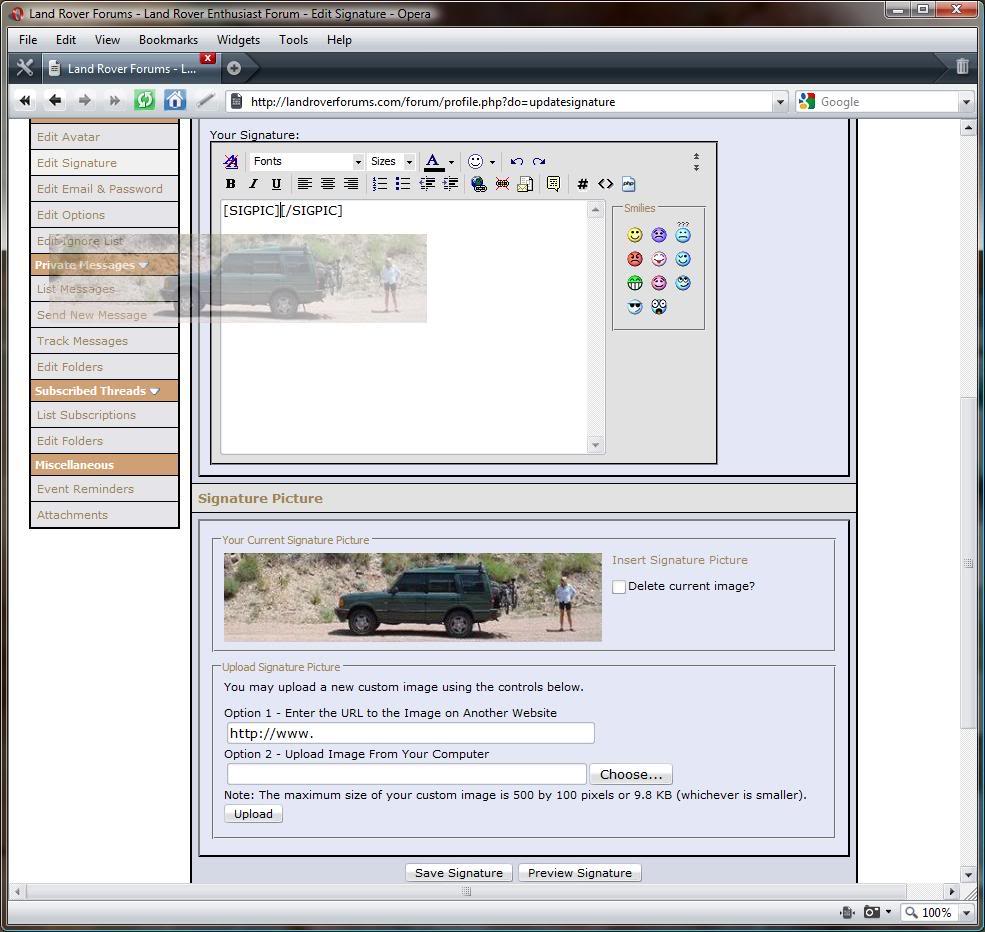
Save it and you are done!!
If you want to center the Picture just Highlight all of the text and then click on the Centered text below the "Fonts" bar
First you will click on User Cp in the Bar above..
Then "Edit Signature"
Then at the bottom of the page you should be able to pick you image from your computer and upload it.
Be advised that:
The maximum size of your custom image is 500 by 100 pixels or 9.8 KB (whichever is smaller).
So you might need to adjust the image you plan on using.
Once you upload the image you should should see it there in the "Edit" page, this does not mean you are done. You need to click the "Insert Sig Picture" text and that will place some [SigPic] text in the text field.
Then simply Grab the image with your cursor while holding left click and drag the image up to the text box.. Position your Curser so that the flashing "|" is beteween the bracketed [SIGPIC]|[SIGPIC] text and then drop it, it should insert a string of text in place of the picture..
Save it and you are done!!
If you want to center the Picture just Highlight all of the text and then click on the Centered text below the "Fonts" bar


Recovery Vehicle
Joined: Aug 2006
Posts: 1,002
Likes: 2
From: Colorado Springs, CO
Pancho,
I can upload the pic. However the "Insert Signature Picture" text (above the "Delete current image" text) that you have circled in red does not appear. There's nothing to click on to get the [SigPic].
I'm stuck on this step:
"Once you upload the image you should should see it there in the "Edit" page, this does not mean you are done. You need to click the "Insert Sig Picture" text and that will place some [SigPic] text in the text field."
I can upload the pic. However the "Insert Signature Picture" text (above the "Delete current image" text) that you have circled in red does not appear. There's nothing to click on to get the [SigPic].
I'm stuck on this step:
"Once you upload the image you should should see it there in the "Edit" page, this does not mean you are done. You need to click the "Insert Sig Picture" text and that will place some [SigPic] text in the text field."
Thread Starter
|
Winching
Joined: Dec 2008
Posts: 558
Likes: 1
From: Oklahoma City
Ill try to help more when I get home..
Email me the picture you want to use and I can probabky circumvent whatever issue you are having by hosting it offsight and just giving you a line of text to post in your sig text box
Email me the picture you want to use and I can probabky circumvent whatever issue you are having by hosting it offsight and just giving you a line of text to post in your sig text box
Thread Starter
|
Winching
Joined: Dec 2008
Posts: 558
Likes: 1
From: Oklahoma City
Ok I cant host it offsight, but I got your picture to work as my sig, carefully follow the steps again,
1. Choose the file to upload
2. Press the upload button below that field
3. Grab the picture and drag it to the text box
4. Place [SIGPIC]image text here[/SIGPIC] around the image text
1. Choose the file to upload
2. Press the upload button below that field
3. Grab the picture and drag it to the text box
4. Place [SIGPIC]image text here[/SIGPIC] around the image text