


Dash Electronics Fan part number?


Thread Starter
|
Mudding
Joined: Aug 2010
Posts: 187
Likes: 9
From: Columbus, OH
 Dash Electronics Fan part number?
Ok didn't want to resurrect an old thread, but here's the reference if you want to look it over.
https://landroverforums.com/forum/sh...ght=noise+dash
There's a small fan on the left side of the dash that's making a significant amount of noise and since I no longer have the amigos (blessed blank dash-ness) I want to get it fixed.
Problem is, the Rover dealership guy thinks I'm nuts. Can't find any sort of "fan" behind the dash. The RAVE didn't help much either.
What is the "official" name of this thing? Or better yet anybody have a part number?
Mucho gracias!
https://landroverforums.com/forum/sh...ght=noise+dash
There's a small fan on the left side of the dash that's making a significant amount of noise and since I no longer have the amigos (blessed blank dash-ness) I want to get it fixed.
Problem is, the Rover dealership guy thinks I'm nuts. Can't find any sort of "fan" behind the dash. The RAVE didn't help much either.
What is the "official" name of this thing? Or better yet anybody have a part number?
Mucho gracias!


Recovery Vehicle
Joined: Feb 2009
Posts: 1,151
Likes: 30
From: Denver, CO
I think this is the part you are looking for. Its a Mini computer fan made by Denso. Only $30 on eBay not too bad.
http://cgi.ebay.com/ebaymotors/Land-...item20acc9320f
http://cgi.ebay.com/ebaymotors/Land-...item20acc9320f

Pro Wrench
Joined: May 2010
Posts: 1,918
Likes: 86
From: St Louis MO
It is the inside air temperature sensor. As best I can tell from the picture in RAVE (Air Conditioning, repairs, sensor - air temperature) the Ebay link looks like the right part. I don't have a part number, but the LR parts guys should be able to find it by the proper name.
Thread Starter
|
Mudding
Joined: Aug 2010
Posts: 187
Likes: 9
From: Columbus, OH

I think this is the part you are looking for. Its a Mini computer fan made by Denso. Only $30 on eBay not too bad.
http://cgi.ebay.com/ebaymotors/Land-...item20acc9320f
http://cgi.ebay.com/ebaymotors/Land-...item20acc9320f
It is the inside air temperature sensor. As best I can tell from the picture in RAVE (Air Conditioning, repairs, sensor - air temperature) the Ebay link looks like the right part. I don't have a part number, but the LR parts guys should be able to find it by the proper name.
Thread Starter
|
Mudding
Joined: Aug 2010
Posts: 187
Likes: 9
From: Columbus, OH
Ok here's the details of this part:
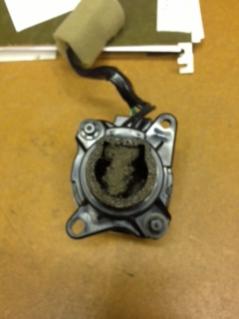
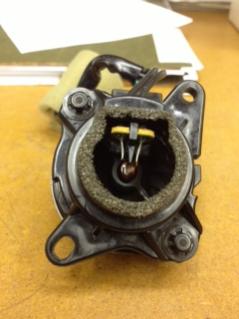
It is called an "in-car temperature sensor":
- Rave manual section 76.46.38.
- Part number JTF100290
- Price: $139.82
Pretty pricey. I'm gonna try to clean mine then maybe go the used route. Or try the radio shack method though I'm not sure how the "sensor" part of it would work.
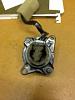
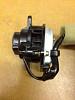
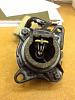
And here's a pic of the location/part:

It is called an "in-car temperature sensor":
- Rave manual section 76.46.38.
- Part number JTF100290
- Price: $139.82
Pretty pricey. I'm gonna try to clean mine then maybe go the used route. Or try the radio shack method though I'm not sure how the "sensor" part of it would work.
And here's a pic of the location/part:

5th Gear
Joined: May 2013
Posts: 5
Likes: 1
From: Chicagoland
Remove the upper instrument binnacle, then the upper steering column cover. Then the blank covering the hole where the headlamp leveling switch would have been, then the mirror switch, then the base plate that all of that sits on. Drop the fuse panel cover. You'll need fairly short phillips to get to the two screws that hold the switch in place from behind. I took mine out today and took it apart and cleaned it. It was pretty gross in there. Not super hard to do, but not having small hands didn't help, either. I can hear mine working now, most likely because i removed all of the nastiness that was dampening the noise.


Thread
Thread Starter
Forum
Replies
Last Post
zombiedisco
General Range Rover Discussion - Archived
6
Aug 31, 2012 07:34 PM
