


cruise control


Thread Starter
|
Drifting
Joined: Jul 2006
Posts: 30
Likes: 0
 cruise control
2000 rover. i do not have an owners manual, and i have yet to get the cruise to come on and set.. i have 2 buttons on the steering wheel .. and can not figure it out.. i punch em, hold em.. still nothing.. is there a button or switch that has to be on first??

Administrator
Joined: Apr 2006
Posts: 25,707
Likes: 108
From: Denver, Colorado
RE: cruise control
I can't remember the names they put on your buttons, push or pull the cruise control button, that should turn on an indicator, either a light or symble showing the cruise control is on, then hit the set button to activate it.
If it is not coming on, you may have a leak in one of the vaccumn lines of the control unit.
Mike
If it is not coming on, you may have a leak in one of the vaccumn lines of the control unit.
Mike

Mudding
Joined: Jul 2005
Posts: 117
Likes: 0
From:
RE: cruise control
There is a button next to the Hazard Light switch, the icon on the switch is identical to the icon next to the indicator light for the Air suspension in highway mode.
EDIT: The light may be burned out as it is on mine, if the switch is pressed in then the cruise control should work
EDIT: The light may be burned out as it is on mine, if the switch is pressed in then the cruise control should work

Three Wheeling
Joined: May 2006
Posts: 87
Likes: 0
From:
RE: cruise control
The cruise control button in my 94 RRC is on the dash by the air susp. buttons. It looks like two tire tracks going under a picnic table. After I finally got mine to work; I just leave it turned on. I have to push the set button and hold it for three seconds and then it kicks in. I played with it for days before getting it to work.

Three Wheeling
Joined: Jul 2006
Posts: 58
Likes: 0
From: new york ny
RE: cruise control
slackware--if your 2000 HSE is the same or similar to my 98 SE, then you need to first depress the switch on the dash, near the hazards button, with the diagram for the highway/overpass. that enables the use of and disables the use of the cruise control in general. then you can engage the set/resume buttons on the steering wheel.

Drifting
Joined: Feb 2014
Posts: 31
Likes: 0
From: Michigan
I have same issue, got a used land rover disco II 99.
I know my light turn on the CC (cruise control) button when i push it (is there a dash indicator light??), but the wheel control does not work when i press "set" to set the speed.
Next step is to check behind the glove box for an CC ECU unit.
Then i will check the vacuum after.
Will keep you updated.
This is what the cruise control looks like.
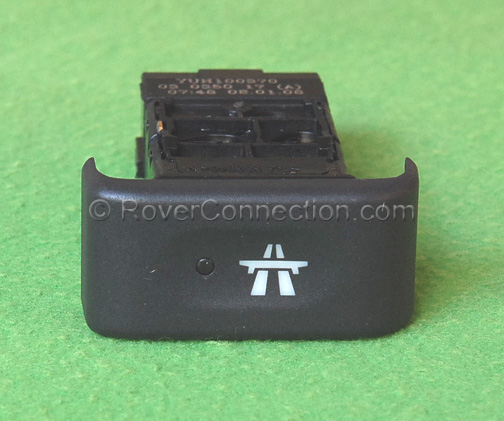
I know my light turn on the CC (cruise control) button when i push it (is there a dash indicator light??), but the wheel control does not work when i press "set" to set the speed.
Next step is to check behind the glove box for an CC ECU unit.
Then i will check the vacuum after.
Will keep you updated.
This is what the cruise control looks like.


Thread
Thread Starter
Forum
Replies
Last Post
Evan5291
Discovery II
10
Nov 21, 2017 07:59 AM
37chambers
General Range Rover Discussion - Archived
6
Oct 18, 2016 10:52 AM
southfloridadiscoII
Discovery II
22
Jun 28, 2009 11:03 PM
flowers
General Tech Help
1
Apr 12, 2005 04:03 PM
