


Homelink on mirror


Thread Starter
|
Mudding
Joined: Mar 2012
Posts: 176
Likes: 2
 Homelink on mirror
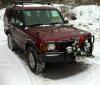
My homelink buttons are on the bottom of my mirror (signaled here by the crappy MS paint arrow), not on the console that is on the ceiling. So, is there some other option that would go in that circled area?


Thread Starter
|
Mudding
Joined: Mar 2012
Posts: 176
Likes: 2
Since I have seen a lot of questions, I will share my experience.
I have two garage doors and they both have rolling codes, so I had to use the longer directions. I followed them, I thought, but I couldn't get my amber colored light to flash at first. Upon further investigation, I read that it can take up to 20 second for it to flash, and mine took all 20 seconds. After I got to that step, programming was a breeze. Follow the instructions.
I programmed my wife's 2007 Honda Odyssey without even reading the instructions, it was the exact same.
The only difference I have seen with this compared to the Honda is that the Honda's buttons work with the key turned to the off position, whereas the Rover has to be at least turned to Accessories to have power to the buttons.
I have two garage doors and they both have rolling codes, so I had to use the longer directions. I followed them, I thought, but I couldn't get my amber colored light to flash at first. Upon further investigation, I read that it can take up to 20 second for it to flash, and mine took all 20 seconds. After I got to that step, programming was a breeze. Follow the instructions.
I programmed my wife's 2007 Honda Odyssey without even reading the instructions, it was the exact same.
The only difference I have seen with this compared to the Honda is that the Honda's buttons work with the key turned to the off position, whereas the Rover has to be at least turned to Accessories to have power to the buttons.

Thread
Thread Starter
Forum
Replies
Last Post
2001, 2007, addng, buttons, disco, discovery, homelink, instructions, land, mirror, program, programming, range, rangerover, rover
