


In-Car / Cabin Temp sensor Fan


Thread Starter
|
Recovery Vehicle
Joined: Dec 2008
Posts: 1,037
Likes: 38
From: North Georgia
 In-Car / Cabin Temp sensor Fan
The Rave manual mentions this fan on page 82-15, but I can find anywhere that describes how to remove it.
That stupid little buzzing noise is driving me CRAZY. I want to pull it while I have everything else apart and clean it up.
HOW DO YOU GET THE DANG FAN OUT?????
That stupid little buzzing noise is driving me CRAZY. I want to pull it while I have everything else apart and clean it up.
HOW DO YOU GET THE DANG FAN OUT?????


Recovery Vehicle
Joined: Sep 2009
Posts: 1,135
Likes: 14
From: Roanoke Valley, VA
If you are hearing a faint hum or fan motor sound behind the instrument cluster area or your auto temp controls seem to be off in regard to what you have to set the temp at to get to a comfortable heat or AC level, then the little fan could be dirty as well as the sensor that pulls interior air over to determine the current interior temp to pass to the thermostat control. The interior air temp sensor has what looks like a bulb that is in the center of a small fan, like you may find in a computer, and like computer fans, it can get completely covered in heavy dust. MAF sensor cleaner has been used by some people to clean it or you can just wipe is off good and put it back in, which I recommend.
To access it, just open the under dash panel below the steering column, like you're accessing the fuse panel. There may or may not be a Styrofoam pad surrounding the column, (its part of the restraint system). If it's there just push it up until the bottom clears the opening where the panel just swung down, and pull the bottom of the Styrofoam out and down. The temp sensor/fan assembly is just behind the little grille to the left of the steering column beside the dash light dimmer control on the front face of the dash towards the driver. Unplug the electrical connector and remove the 2 screws. You need a real short #2 Phillips screwdriver to get them out. It may sound complicated, but it's really not. Clean and reassemble, and re-connect electrical connector.
To access it, just open the under dash panel below the steering column, like you're accessing the fuse panel. There may or may not be a Styrofoam pad surrounding the column, (its part of the restraint system). If it's there just push it up until the bottom clears the opening where the panel just swung down, and pull the bottom of the Styrofoam out and down. The temp sensor/fan assembly is just behind the little grille to the left of the steering column beside the dash light dimmer control on the front face of the dash towards the driver. Unplug the electrical connector and remove the 2 screws. You need a real short #2 Phillips screwdriver to get them out. It may sound complicated, but it's really not. Clean and reassemble, and re-connect electrical connector.

Last edited by Rover_Hokie; Apr 13, 2015 at 11:22 AM.
Thread Starter
|
Recovery Vehicle
Joined: Dec 2008
Posts: 1,037
Likes: 38
From: North Georgia
I knew what and where it was, my problem is trying to figure out how to get it out.
Thanks Hokie (thought I would never use those two words together). The small screwdriver might do the trick. I'll give it another look.
Do you guys think I could just use electrical cleaner on it, or does it have to be MAF cleaner?
Thanks Hokie (thought I would never use those two words together). The small screwdriver might do the trick. I'll give it another look.
Do you guys think I could just use electrical cleaner on it, or does it have to be MAF cleaner?
Thread Starter
|
Recovery Vehicle
Joined: Dec 2008
Posts: 1,037
Likes: 38
From: North Georgia
Thanks for the tip on the stubby and taking out the Styrofoam piece. I was looking for screws that came in from the bottom instead of side.
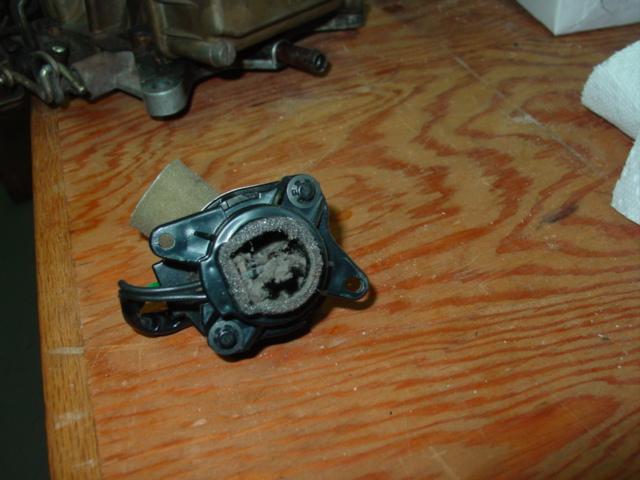
Got it.
Wasn't very dirty. Hope this makes it quieter and stops driving me crazy!!!
Got it.
Wasn't very dirty. Hope this makes it quieter and stops driving me crazy!!!
Recovery Vehicle
Joined: Sep 2009
Posts: 1,135
Likes: 14
From: Roanoke Valley, VA
Honestly those were notes I borrowed from a forum some time back and put in my personal "D2 Notes for Life Document" I keep building for reference. I hate to try to remember how I fixed something last time.  I did not mean to provide too much information, just copied & paste from my notes and hoping to provide the details for all those others who may follow using a search. In regard to getting the fan assembly out, I just had to play with it. I think a stubby did the trick. Not sure on just spraying in place.
I did not mean to provide too much information, just copied & paste from my notes and hoping to provide the details for all those others who may follow using a search. In regard to getting the fan assembly out, I just had to play with it. I think a stubby did the trick. Not sure on just spraying in place.
Last edited by Rover_Hokie; Apr 13, 2015 at 11:22 AM.

Thread Starter
|
Recovery Vehicle
Joined: Dec 2008
Posts: 1,037
Likes: 38
From: North Georgia
Anyone have a part number for this stupid sensor/fan?
I can't think of a single negative to just disconnecting it. Does anyone know of any. Will it hamper the climate control system?
I can't think of a single negative to just disconnecting it. Does anyone know of any. Will it hamper the climate control system?

Thread
Thread Starter
Forum
Replies
Last Post
twilightcall
Discovery II
14
Mar 4, 2018 06:55 PM
rrbc
General Range Rover Discussion - Archived
3
Nov 13, 2009 04:59 PM