


is it possible to remove the front abs sensors without removing the hubs?


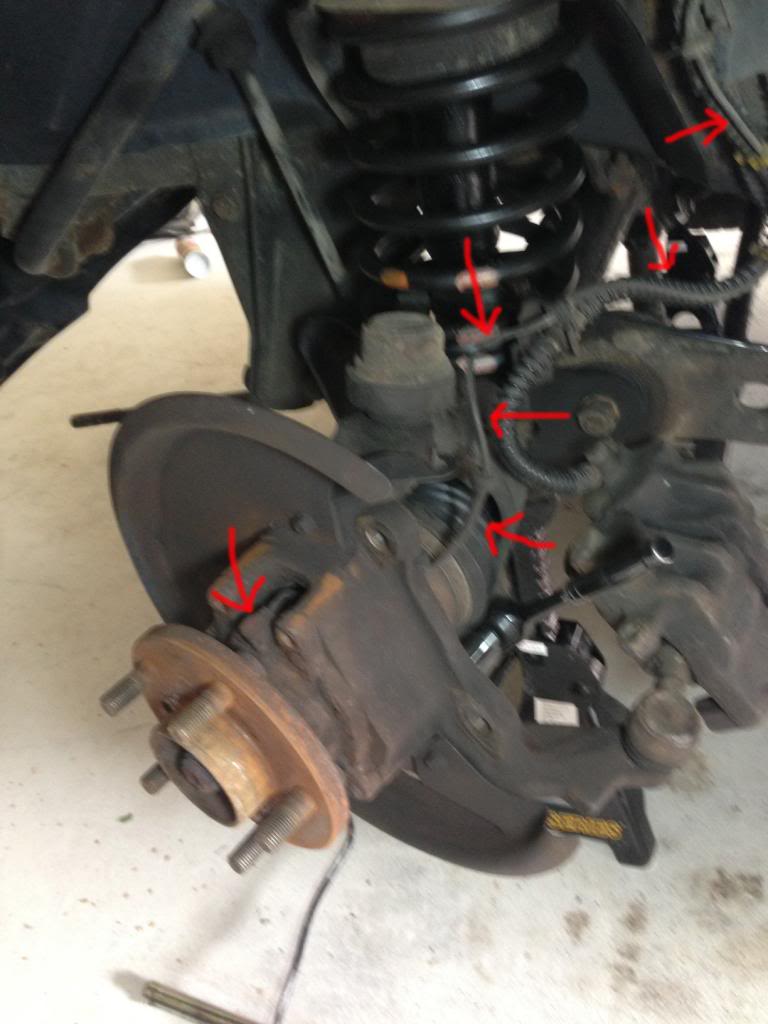
Yes you can. Hub removal is a major PITA, especially if you have rusted on Stake Nut. To get around it, unplug the ABS sensor wire in the engine compartment and pull it through the wheel well all the way down to the hub. The circular plastic cap on the plug connection from inside the engine compartment is approx .5 to 1mm to wide to fit through the slot in the hub. I used a pair of pliers to gently flatten two sides of the plastic casing just a little so it can be nudged through. I've replaced two this way and have not had any issues nor does it affect its ability to plug back in. Two quick things to note:
1) Confirm the new sensor is good. Plug the new sensor into the connection within the engine compartment and just leave it hanging there. Start the truck, don't move it, and verify you get no lights. If no lights shut it off and proceed with replacement. I really wished I had done this first. before putting in a faulty sensor and having to do it all over again.
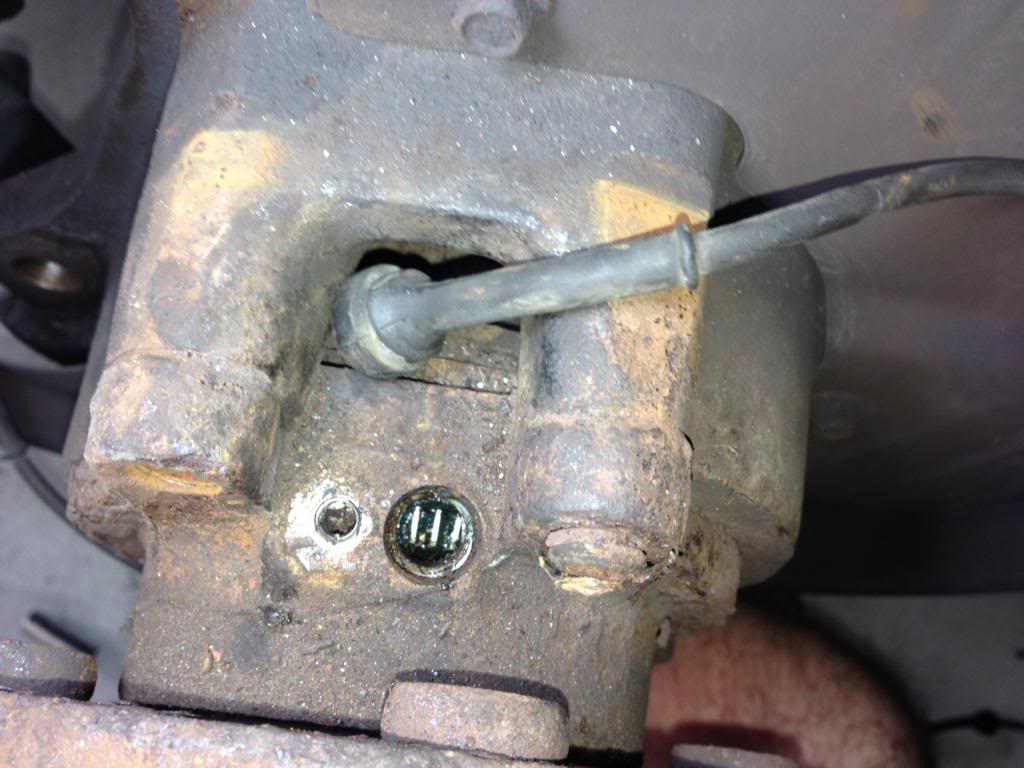
2) I did get the dreaded three amigos popping back on after I replaced the left front side. Only when speeds got above 10 mph. The only thing that fixed it was to add gear luge to the end of it before putting it back in. You'll see in this picture the teeth the sensor reads inside the hub. There seems to be a 1/4" space in between the end of the sensor and the teeth. For some odd reason the sensor was not getting a good reading without the space filled with lube. You'll notice it cake on the end when you remove as well. I've not read of anyone else having that issue but thought I'd pass it along.
1) Confirm the new sensor is good. Plug the new sensor into the connection within the engine compartment and just leave it hanging there. Start the truck, don't move it, and verify you get no lights. If no lights shut it off and proceed with replacement. I really wished I had done this first. before putting in a faulty sensor and having to do it all over again.
2) I did get the dreaded three amigos popping back on after I replaced the left front side. Only when speeds got above 10 mph. The only thing that fixed it was to add gear luge to the end of it before putting it back in. You'll see in this picture the teeth the sensor reads inside the hub. There seems to be a 1/4" space in between the end of the sensor and the teeth. For some odd reason the sensor was not getting a good reading without the space filled with lube. You'll notice it cake on the end when you remove as well. I've not read of anyone else having that issue but thought I'd pass it along.
Last edited by caymandrew; May 21, 2013 at 02:04 PM.
Ohh, you'll be able to see it behind the hub once you pull the rotor. The wire just snaps in all of its connections except on the hub itself, and runs up into the top of the wheel well following the break line. You behind the wheel, it's the only other cable that follows the break line out of the hub.
Thread Starter
|
Rock Crawling
Joined: Jan 2012
Posts: 498
Likes: 20
From: Belton, TX
Well, got her done. It was a challenge getting past the hole through the hub. Didnt fix my issue and now the three lights are on permanently. Truck kinda nudges to the right when hitting the brakes.
You did test the new sensor first? Do the lights come on after you reach speeds above 10 mph? Did you try filling that gap with grease? What code we're you getting that made you change it in the first place?

"2) I did get the dreaded three amigos popping back on after I replaced the left front side. Only when speeds got above 10 mph. The only thing that fixed it was to add gear luge to the end of it before putting it back in. You'll see in this picture the teeth the sensor reads inside the hub. There seems to be a 1/4" space in between the end of the sensor and the teeth. For some odd reason the sensor was not getting a good reading without the space filled with lube. You'll notice it cake on the end when you remove as well. I've not read of anyone else having that issue but thought I'd pass it along. "
Hey that gear lube trick worked for me! The sensor was testing fine but I kept getting "right front sensor output bad". After I read this thread I pulled the sensor out, put a load of lube on it, stuck it back in, cleared the codes and its been good since. It's only been 1 day but I ran it hard in the creek bed near me and no amigos. I'd say that's a win!
Hey that gear lube trick worked for me! The sensor was testing fine but I kept getting "right front sensor output bad". After I read this thread I pulled the sensor out, put a load of lube on it, stuck it back in, cleared the codes and its been good since. It's only been 1 day but I ran it hard in the creek bed near me and no amigos. I'd say that's a win!