


Finally Out of the garage, but...

Pro Wrench
Joined: Apr 2018
Posts: 1,516
Likes: 442
From: SE PA

Your interpretation is correct but the point is that the capacity of the cooling system in these trucks will keep overall temps much cooler with a thermostat that opens up sooner, and that temps over 210° are abnormal with a 180° thermostat. Sitting still versus moving, health of water pump, radiator, thermostat and ambient air are all variables which cause us all to see different temps on a minor scale but generally speaking 180° thermostats will not let the coolant temps get over 210°.

TReK
Joined: Nov 2011
Posts: 2,748
Likes: 506
From: Seattle, Wa
@ CollieRover... I don't let mine over 210 either but that doesn't change the fact that the factory design was 215 - 220 with the stock T-stat. That was done to burn off excess combustion gasses for emissions purposes. Nearly all of these vehicles ran at those temps until they were out of warranty and people started working on them themselves...
To the OP, Judging by your heat issues I would say that is a clue... Possible air in the system somewhere or a partially clogged heater core.
Was it bled properly?
To the OP, Judging by your heat issues I would say that is a clue... Possible air in the system somewhere or a partially clogged heater core.
Was it bled properly?

Thread Starter
|
Drifting
Joined: Feb 2018
Posts: 28
Likes: 5
@ CollieRover... I don't let mine over 210 either but that doesn't change the fact that the factory design was 215 - 220 with the stock T-stat. That was done to burn off excess combustion gasses for emissions purposes. Nearly all of these vehicles ran at those temps until they were out of warranty and people started working on them themselves...
To the OP, Judging by your heat issues I would say that is a clue... Possible air in the system somewhere or a partially clogged heater core.
Was it bled properly?
To the OP, Judging by your heat issues I would say that is a clue... Possible air in the system somewhere or a partially clogged heater core.
Was it bled properly?
TReK
Joined: Nov 2011
Posts: 2,748
Likes: 506
From: Seattle, Wa
The loud noise and vibration come from the blower fan. Under the glove box, very simple to remove and clean... It will get full of debris if you are running without a plenum filter in the cowl.
To test if you have fully bled the system: When the engine is cold, like first thing in the morning cold... open the bleed screw... if coolant is right up to the top it is bled right... if not, top it off right through the bleed screw hole. If you have to do that, drive it, then check again the next morning and add more coolant if necessary... Repeat until there is no more air bubble.
To test if you have fully bled the system: When the engine is cold, like first thing in the morning cold... open the bleed screw... if coolant is right up to the top it is bled right... if not, top it off right through the bleed screw hole. If you have to do that, drive it, then check again the next morning and add more coolant if necessary... Repeat until there is no more air bubble.
Last edited by Dave03S; May 14, 2020 at 03:20 PM.
Thread Starter
|
Drifting
Joined: Feb 2018
Posts: 28
Likes: 5
The loud noise and vibration come from the blower fan. Under the glove box, very simple to remove and clean... It will get full of debris if you are running without a plenum filter in the cowl.
To test if you have fully bled the system: When the engine is cold, like first thing in the morning cold... open the bleed screw... if coolant is right up to the top it is bled right... if not, top it off right through the bleed screw hole. If you have to do that, drive it, then check again the next morning and add more coolant if necessary... Repeat until there is no more air bubble.
To test if you have fully bled the system: When the engine is cold, like first thing in the morning cold... open the bleed screw... if coolant is right up to the top it is bled right... if not, top it off right through the bleed screw hole. If you have to do that, drive it, then check again the next morning and add more coolant if necessary... Repeat until there is no more air bubble.

Rock Crawling
Joined: Aug 2019
Posts: 427
Likes: 138
From: Boston, MA
Rather than adding coolant directly through the bleed hole (slow and annoying), I've had some very good success with this method:
1. Remove bleeder screw and coolant tank cap
2. Squeeze the upper hose to push air out of the bleeder screw
3. Put your finger over the bleed hole and release the hose, so that new coolant is sucked into the system from the expansion tank
4. Continue until coolant flows from the bleed screw.
Haven't seen this mentioned on here before, but have seen many people recommending filling through the bleed screw. This is easier, tidier, and faster.
1. Remove bleeder screw and coolant tank cap
2. Squeeze the upper hose to push air out of the bleeder screw
3. Put your finger over the bleed hole and release the hose, so that new coolant is sucked into the system from the expansion tank
4. Continue until coolant flows from the bleed screw.
Haven't seen this mentioned on here before, but have seen many people recommending filling through the bleed screw. This is easier, tidier, and faster.
TReK
Joined: Nov 2011
Posts: 2,748
Likes: 506
From: Seattle, Wa
Yes, The long foam filter goes across right below the windshield under the hood, there are plastic clips to hold it in place.
Air bubbles land under the bleed screw because that is the high point of the system. Once the system is depressurized you can safely open it an top it off!
I used a paper cup bent into a V on one side to pour coolant into there as I didn't have a tiny funnel.... I tend not to use methods that require coolant spewing out of the bleed screw as I live in an apartment where I don't want to make any messes. I found adding through the bleed hole to be less messy even though a tiny bit tedious. Good idea to use the suction of your finger but I prefer to not spill any.
Three screws remove the fan cage... You might also want to clean and lube it while you have it out.
Air bubbles land under the bleed screw because that is the high point of the system. Once the system is depressurized you can safely open it an top it off!
I used a paper cup bent into a V on one side to pour coolant into there as I didn't have a tiny funnel.... I tend not to use methods that require coolant spewing out of the bleed screw as I live in an apartment where I don't want to make any messes. I found adding through the bleed hole to be less messy even though a tiny bit tedious. Good idea to use the suction of your finger but I prefer to not spill any.
Three screws remove the fan cage... You might also want to clean and lube it while you have it out.
Last edited by Dave03S; May 14, 2020 at 05:26 PM.
Thread Starter
|
Drifting
Joined: Feb 2018
Posts: 28
Likes: 5
A good start
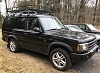
Hey all. Getting back to you about some progress. I really appreciate all the Input/advice. Thanks for that! I replaced the battery cables and that solved 14 of the 17 codes I was getting. So, battery cables and connections are important. Who woulda thought? The remaining problems were MS flashing lights and o2 sensor errors. I replaced the o2 sensors and took a good hard drive with NO problems. Truck runs great! “bro it’s not a truck” as I’m told. 🤷♂️ The coolant fill from the bleed valve trick seemed to work too, although I feel like the heater could be hotter. I hovered around 183-190F Engine temp on a fairly hard drive (2000 ft elevation gain and topped 70mph for about 45 min) I found that my ACE pump is shot and drained the fluid, as there is a leak too. But other than that it appears I’ve got a really good running Disco. Can’t thank you guys enough and the whole Landy community for the help. Absolutely tops!

Thread
Thread Starter
Forum
Replies
Last Post
*RANGER*
General Range Rover Discussion - Archived
3
Mar 12, 2008 05:17 PM

