


Grom Audio...?


Mudding
Joined: Apr 2010
Posts: 135
Likes: 0
From: Middletown, DE

I have the Grom as well. Works flawlessly and allows you to use the steering wheel controls as well. I have tried a couple of the cheaper alternatives but the Grom unit is the best by far.
Cybercop, do me a favor and PM me those instructions, i can't get my factory DVD player to work with it so want to check out what you did.
Cybercop, do me a favor and PM me those instructions, i can't get my factory DVD player to work with it so want to check out what you did.

Drifting
Joined: Oct 2014
Posts: 40
Likes: 3
From: Buffalo, NY
Have a GROm in my green D2 - works nicely - easy to set up and retains wheels controls.
Have a Kenwood KMM-BT312U media player in the blue one. Fits nicely and is short so fits in stock hole. Tried a wheel adapter but it only worked once.
I like both. Phone integration is way better on Kenwood if making calls. The Kenwood is only $100 so its actually a cheaper solution but longer install time since I soldered the wires. FM reception is also much better. GROM was a easy plug and play.
Have a Kenwood KMM-BT312U media player in the blue one. Fits nicely and is short so fits in stock hole. Tried a wheel adapter but it only worked once.
I like both. Phone integration is way better on Kenwood if making calls. The Kenwood is only $100 so its actually a cheaper solution but longer install time since I soldered the wires. FM reception is also much better. GROM was a easy plug and play.
Three Wheeling
Joined: Aug 2014
Posts: 64
Likes: 1
From: Boston ma
Hi cybercop
I'm not looking to keep my factory dvd player, so i'm not sure if i need your instructions.
Can you pass them on if you think Ill need them.
Thanks
Micko

Recovery Vehicle
Joined: Dec 2008
Posts: 1,048
Likes: 41
From: North Georgia
Sure will. Just PM me. I am not home right now and not sure if I have them on the computer I travel with. I will check
Three Wheeling
Joined: Aug 2014
Posts: 64
Likes: 1
From: Boston ma
Got the Grom bluetooth yesterday & installed it.
Fit it in behind the right side of the climate control & radio, Half & half. I was surprised how easy the set up was. I pushed it in through the right side of the climate control & up. Pushed the radio in first & then the Cc
Works great.
Fit it in behind the right side of the climate control & radio, Half & half. I was surprised how easy the set up was. I pushed it in through the right side of the climate control & up. Pushed the radio in first & then the Cc
Works great.
Recovery Vehicle
Joined: Sep 2014
Posts: 1,201
Likes: 119
From: Putnam county. NY.
Hmmm.. I've been waiting to get around to finding something like this.
I'd get the blue tooth integrated one. ROVER LANDROVER 99-05 Bluetooth Hands Free Car Adapter Kit
I assume the whole thing gets hidden behind the stereo? If so, do I just route the wired inputs to some where sensible? I would mainly Bluetooth an iPod or iPhone, but with the available aux 3.5mm input I would need to have it appear somewhere from the dash?
Anyone confirm the plug is compatible with this unit? Details say Alpine. Mine is unbranded from the front.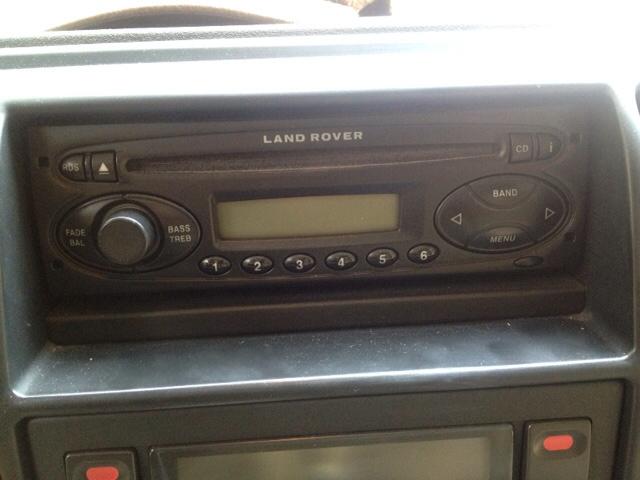
I'd get the blue tooth integrated one. ROVER LANDROVER 99-05 Bluetooth Hands Free Car Adapter Kit
I assume the whole thing gets hidden behind the stereo? If so, do I just route the wired inputs to some where sensible? I would mainly Bluetooth an iPod or iPhone, but with the available aux 3.5mm input I would need to have it appear somewhere from the dash?
Anyone confirm the plug is compatible with this unit? Details say Alpine. Mine is unbranded from the front.
Last edited by cappedup; Jul 5, 2015 at 02:22 PM.

Baja
Joined: Aug 2013
Posts: 6,919
Likes: 794
From: Huntington Beach CA
I'm 98.2% sure it does. I can remember removing that stereo and being happy as I saw the port to still connect the grom even though it was the "low" end stereo.
With that said, buy the Grom at your own risk!
If I recall the blue connector for the disc changer is the one you are replacing with the grom
With that said, buy the Grom at your own risk!
If I recall the blue connector for the disc changer is the one you are replacing with the grom
Thread Starter
|
Mudding
Joined: May 2010
Posts: 149
Likes: 3
From: Eastern Canada
Hello,
My Rover LandRover 99-05 USB Android iPod Bluetooth AUX car kit( SKU: RVRU3 ) arrived today!
I worked on the install this afternoon - I used hanging file folder clips to remove the radio quite easily. Finally found if I removed the styrofoam behind the panel below the steering wheel I could have room there to place the unit - then I ran the vehicle specific cable up to the head unit using the gas/4-way/etc. button group hole to feed the cable - I removed the blue and green connectors from the head unit and plugged the blue Grom connector in. I ran the USB and AUX/USB cables through the dash behind the climate control unit (coming out left of the glove box - also removed for installation) removing the gas/4-way/etc. button group and the clock/lock units to give access for feeding. I left the Bluetooth unit under the steering wheel and ran the mic cable up the side by the door hinges, behind the a pillar interior cover, behind the fabric edge along the roof against the windshield, and then out, stuck onto the rear view mirror support.
In testing out the unit a ton of times I've found the following works:
-iPod input into the USB for CDs 2-6 (iPod playlists controlled by truck systems),
-The USB charging cable that's paired with the aux cord, and
-Bluetooth - including output of phone sounds, output of streaming audio from phone, and mic for calls - also the unit switches over from phone sounds back to the iPod tracks - the next button on the steering wheel works for answering and hanging up.
A few things don't work yet (anyone have any ideas??):
-The aux input - I have no idea how to switch the Grom unit to the aux function. Following the instructions to switch to FM then back to CD and then press next following announcements of which mode you're in doesn't work for me - I hear no announcements (ever) - all I get when I do that is 'CD check' on the screen and then it goes back to the iPod input.
-CD 1 on the iPod input (USB) - this is supposed to allow iPod input via USB while allowing you to control the iPod from the iPod (rather than CDs 2-6 which are iPod playlists controlled by the truck's systems - working - above) - when I switch to this I get 'CD1-70' and nothing happens.
Any advice on the not working bits and any tips or tricks would be much appreciated!
Thanks!
My Rover LandRover 99-05 USB Android iPod Bluetooth AUX car kit( SKU: RVRU3 ) arrived today!
I worked on the install this afternoon - I used hanging file folder clips to remove the radio quite easily. Finally found if I removed the styrofoam behind the panel below the steering wheel I could have room there to place the unit - then I ran the vehicle specific cable up to the head unit using the gas/4-way/etc. button group hole to feed the cable - I removed the blue and green connectors from the head unit and plugged the blue Grom connector in. I ran the USB and AUX/USB cables through the dash behind the climate control unit (coming out left of the glove box - also removed for installation) removing the gas/4-way/etc. button group and the clock/lock units to give access for feeding. I left the Bluetooth unit under the steering wheel and ran the mic cable up the side by the door hinges, behind the a pillar interior cover, behind the fabric edge along the roof against the windshield, and then out, stuck onto the rear view mirror support.
In testing out the unit a ton of times I've found the following works:
-iPod input into the USB for CDs 2-6 (iPod playlists controlled by truck systems),
-The USB charging cable that's paired with the aux cord, and
-Bluetooth - including output of phone sounds, output of streaming audio from phone, and mic for calls - also the unit switches over from phone sounds back to the iPod tracks - the next button on the steering wheel works for answering and hanging up.
A few things don't work yet (anyone have any ideas??):
-The aux input - I have no idea how to switch the Grom unit to the aux function. Following the instructions to switch to FM then back to CD and then press next following announcements of which mode you're in doesn't work for me - I hear no announcements (ever) - all I get when I do that is 'CD check' on the screen and then it goes back to the iPod input.
-CD 1 on the iPod input (USB) - this is supposed to allow iPod input via USB while allowing you to control the iPod from the iPod (rather than CDs 2-6 which are iPod playlists controlled by the truck's systems - working - above) - when I switch to this I get 'CD1-70' and nothing happens.
Any advice on the not working bits and any tips or tricks would be much appreciated!
Thanks!
I have an older unit and eventually rewired the power to a different fuse, because it was applying a draw when the key was off. There is a thread on it. Otherwise, I love it. I have had it for 6 years so that may be fixed on it.
To switch modes on mine you hit "FM" then the "CD" button in succession. Then a voice will saya mode and you hit the "Forward" button on the steering wheel to advance to the next mode.
To switch modes on mine you hit "FM" then the "CD" button in succession. Then a voice will saya mode and you hit the "Forward" button on the steering wheel to advance to the next mode.